
Applying for a Grant
This page explains everything you need to know before applying for a grant.
Please take time to read it carefully — it can save you and us time later.
You can find the next meeting date and application deadline on our Home and News pages.
General Eligibility
The Trust gives grants to:
- Registered charities
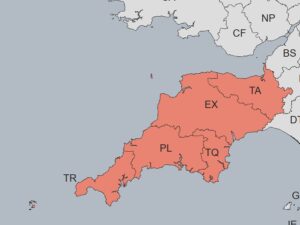
Our area of benefit
- Other non-profit organisations, including state schools
We do not give grants to:
- Individuals
- Projects outside Devon, Cornwall, or Somerset (TA postcodes)
- Organisations involved in live animal research or testing
- Maintenance or repair of religious buildings
- Projects that are religious in nature
Faith organisations and churches can apply for secular projects or community facilities, as long as these are open to everyone and not just for people of one faith.
Important: You must apply using our online form and upload all documents electronically. The link to the form is at the bottom of this page. Please read all sections before applying.
How We Consider Applications
You can submit your application at any time.
The Grants Sub-Committee meets every two months to review applications.
To have your application considered at a specific meeting, make sure it is sent before the published deadline.
Deadlines are shown on our Home and News pages and are strictly followed. However, Trustees may consider urgent applications received after the deadline at their discretion.
Incomplete applications may be postponed to the next meeting.
The Trust has produced an AI Policy which details how Trustees and Staff may use AI. Please note that the Trust does not use AI to score or make decisions on grant applications.
It also has some Guidelines for Applicants on the use of AI in making applications to the Trust. Please have a read through these before preparing your application.
How Often You Can Apply?
Each organisation can make one application per financial year.
We only allow more than one application in very rare cases, such as when an umbrella organisation applies for several separate projects.
If you are unsure when you can reapply, please contact us.
If your previous grant offer required a monitoring report, you must complete that before reapplying.
Typical Grant Amounts
Most grants are between £1,000 and £5,000.
Because funds are limited, we may only be able to fund part of your request.
We want you to apply to other funders as well. Your application is unlikely to be successful if you haven’t done so.
What We Fund
We can fund core or running costs, but prefer not to do so on an ongoing basis.
If you apply again next year for the same costs, we’re unlikely to fund them.
Trustees prefer to fund:
- Specific projects – please supply a project budget and specify which element(s) the funding request is for
- Building or refurbishment work (capital costs) – please supply a quote/budget for the works
- Equipment purchases – please supply a list of items and prices and where you will be purchasing them from
Please include a clear breakdown of how you will use the grant, either in the application form or as an attachment.
If this information is missing, we will ask for it, which could delay your application. We’re having to go back and ask for this information from the majority of applicants at present, which slows down our process considerably.
For more details about the Trust’s funding, please visit our Facts & Figures page.
Grant Payments
You must provide proof of your organisation’s bank details when you apply.
We cannot make any payments without this information, and missing details may delay your application.
Your proof must clearly show:
- Bank name or logo
- Organisation’s account name
- Sort code (6 digits)
- Account number (8 digits)
Acceptable proof of bank details:
- Paying-in slip
- Recent bank statement
- Cancelled cheque
- Screenshot from online banking (must show all details clearly)
We cannot accept bank details written on headed paper or a compliment slip.
This is to protect against fraud.
All grants are paid by BACS directly to the organisation’s bank account (not an individual’s account).
If you are a state school using local authority banking (for example, through Devon County Council), please provide your account details and any school reference number.
How to Apply
- Complete the online application form (link below).
- You’ll receive an automatic confirmation once your form is submitted.
- Within a few days or weeks (depending on our meeting cycle), we’ll send a separate email confirming:
- Which meeting your application will go to
- A 5-digit reference number to use in future correspondence
All communication will be by email. Please use an address you check regularly.
You’ll receive the result of your application within a few days after the meeting date.
Please check your spam or junk folder before contacting us.
Documents to Upload
When applying, please upload the following documents:
- Your organisation’s most recent accounts
- Registered charities: You don’t need to upload these if they are on the Charity Commission website.
- Community groups, CICs and others: Please upload your latest accounts.
- Schools which are financially managed by the local authority or multi academy trusts do not need to provide accounts.
- If your accounts are more than 9 months old, include draft or management accounts showing current figures.
- Quotes or a budget for any equipment, capital items, or projects.
- A covering letter on headed paper, if possible.
- Proof of your bank details (see section above).
PDFs are best, but JPG or PNG files are fine for images.
Please name your files clearly (for example, “YourCharity_Accounts2024.pdf”) so we can identify them easily.
If key documents are missing, we’ll contact you by email, however, this may delay your application until a later meeting.
Terms & Conditions
You must read and agree to the Trust’s Terms and Conditions of Grant before submitting your application.
Any grant awarded will be subject to these terms.
You can view and download them HERE.
NEW Funding Categories
When completing the online form, you’ll be asked to choose a main category and sub-category for your project.
Please read this guidance on our website to help you choose the most suitable category (opens in a new tab).
Summary Checklist
✅ Read all guidance before applying
✅ Apply online only (no postal applications)
✅ Check meeting deadlines
✅ Upload required documents (accounts, quotes/project budget, bank proof, covering letter) – e-mail these separately if necessary
✅ Use a regularly checked email address
✅ Only one application per organisation per financial year
How your information will be used by the Trust – View our Privacy Statement
Exeter Cathedral – June 2023